> ## Documentation Index
> Fetch the complete documentation index at: https://docs.way.co/llms.txt
> Use this file to discover all available pages before exploring further.
# Authentication
> Authenticate to the Way API with an API key sent as a bearer token
Every Way API request is authenticated with a single header - there are no tokens to refresh:
```
Authorization: Bearer way_sk_live_bMQ8BHPjMQX_97rJKxAVjkg
```
The key itself identifies your brand (or organization) and its environment, so no ID headers are needed.
Still sending `Way-Brand-Id` + `Way-Secret-Key` headers with an older key? That method keeps working - see [Legacy authentication](/legacy-authentication). You can switch at any time by creating a new key.
## Create an API key
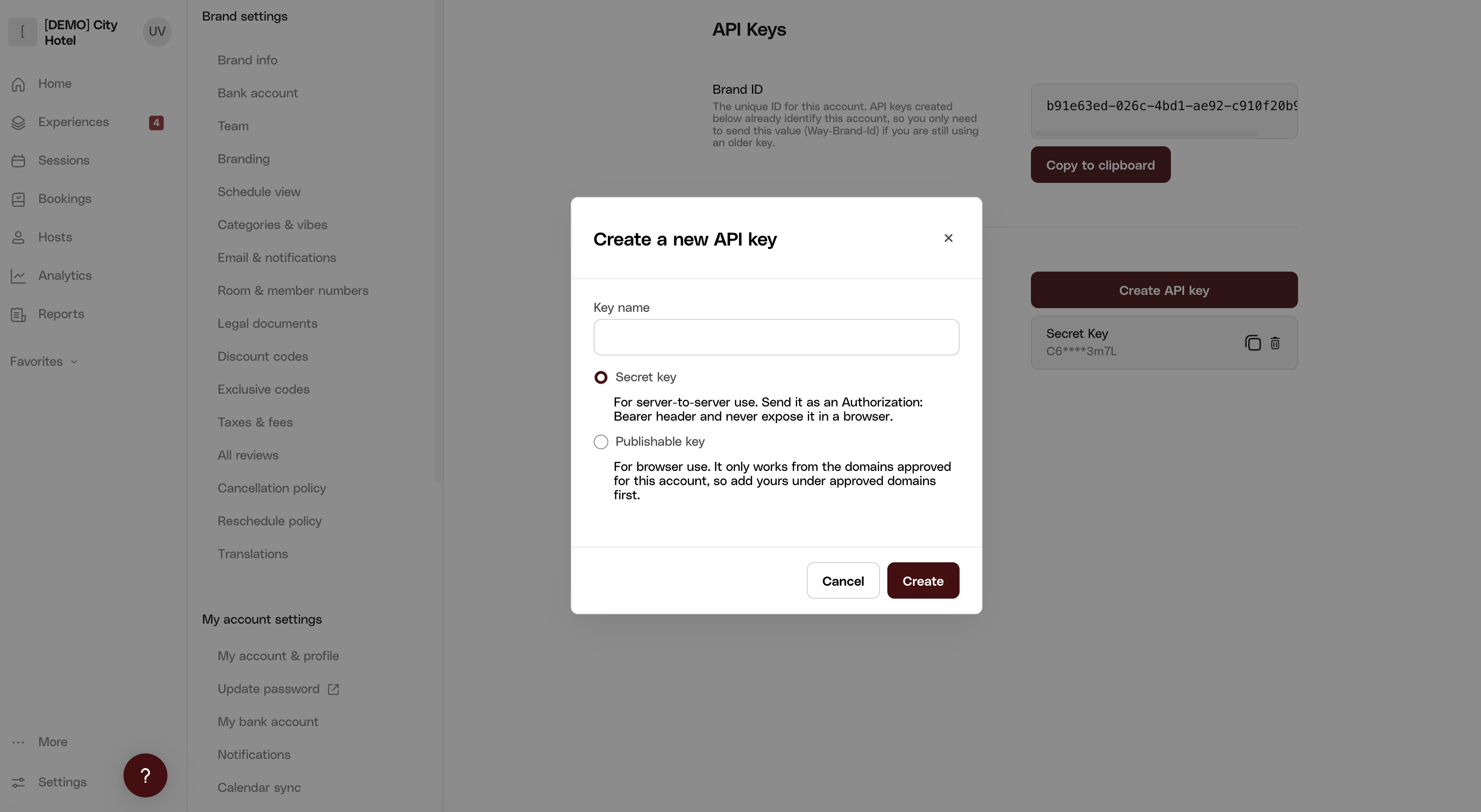
In the Way dashboard, go to **Settings → Developers → API Keys** and select **Create API key**. Name the key and choose its type:
* **Secret key** (`way_sk_...`) - for server-to-server use. Send it as an `Authorization: Bearer` header and never expose it in a browser.
* **Publishable key** (`way_pk_...`) - for browser use. It only works from the domains approved for your account, so add yours under approved domains first.
 Secret keys must only be used from your server. Never embed one in client-side code or expose it to end users - use a publishable key in the browser instead.
## Key format
```
way___
```
Everything about the key is readable from its prefix:
| Segment | Meaning |
| --------------- | ----------------------------------------------------------------------------------------------------------------------- |
| `sk` / `pk` | Secret or publishable key |
| `live` / `test` | Environment - `live` keys only work against production, `test` keys against staging. See [Environments](/environments). |
## Verify your credentials
Fetch your brand's settings (replace the Brand ID and key with your own):
```bash theme={null}
curl \
-X GET \
-H "Authorization: Bearer [Your API Key]" \
-H "Content-Type: application/json" \
https://api.letsway.com/v1/brands/[Your Brand ID]/settings
```
If successful, you will receive a response that looks like the following:
```json theme={null}
{
"data": {
"brandEmail": "",
"paymentPlatform": "stripe-us",
"currency": "USD",
"wayVersion": "V1",
"products": ["activate"],
"paymentMethods": {
"card": true,
"apple_pay": true,
"google_pay": true
},
"cancellationPolicyId": ""
}
}
```
## Brand keys and organization keys
A key is issued to either a brand or an organization:
* **Brand key** - created in your brand's dashboard; scoped to that brand. A request naming a different brand (in the URL path or a header) fails with `403 Forbidden`.
* **Organization key** - created under **Organizations → API Keys**; authorizes every brand in your organization, including brands of child organizations.
An organization key can be used two ways:
* **Organization-wide** - send just the bearer token: for organization-scoped endpoints like [Get organization brands](/api-reference/organizations/get-organization-brands), and for brand-scoped endpoints whose resource (experience, cart, booking) is identified in the URL path.
* **Scoped to one brand** - add a `Way-Brand-Id: [Brand ID]` header (or use the brand's ID in the URL path): the response is scoped to that brand, exactly as if you had used the brand's own key.
Requests for a brand or resource outside the key's organization fail with `403 Forbidden`. Each endpoint's reference page shows the key types it accepts.
```
curl \
-X GET \
-H "Authorization: Bearer [Your Organization API Key]" \
-H "Content-Type: application/json" \
https://api.letsway.com/v1/organizations/[Your Organization ID]/brands
```
If successful, you will receive a response that looks like the following:
```json theme={null}
{
"items": [
{
"id": "b91e63ed-026c-4bd1-ae92-c910f20b9aa0",
"name": "The City Hotel",
"tier": "growth",
"countryCode": "US",
"currency": "USD",
"isTestBrand": false,
"organizationId": "94a6fbf3-586f-42fb-b52a-90fa962bc4d7",
"products": [
"host",
"activate",
"reserve"
]
}
]
}
```
Secret keys must only be used from your server. Never embed one in client-side code or expose it to end users - use a publishable key in the browser instead.
## Key format
```
way___
```
Everything about the key is readable from its prefix:
| Segment | Meaning |
| --------------- | ----------------------------------------------------------------------------------------------------------------------- |
| `sk` / `pk` | Secret or publishable key |
| `live` / `test` | Environment - `live` keys only work against production, `test` keys against staging. See [Environments](/environments). |
## Verify your credentials
Fetch your brand's settings (replace the Brand ID and key with your own):
```bash theme={null}
curl \
-X GET \
-H "Authorization: Bearer [Your API Key]" \
-H "Content-Type: application/json" \
https://api.letsway.com/v1/brands/[Your Brand ID]/settings
```
If successful, you will receive a response that looks like the following:
```json theme={null}
{
"data": {
"brandEmail": "",
"paymentPlatform": "stripe-us",
"currency": "USD",
"wayVersion": "V1",
"products": ["activate"],
"paymentMethods": {
"card": true,
"apple_pay": true,
"google_pay": true
},
"cancellationPolicyId": ""
}
}
```
## Brand keys and organization keys
A key is issued to either a brand or an organization:
* **Brand key** - created in your brand's dashboard; scoped to that brand. A request naming a different brand (in the URL path or a header) fails with `403 Forbidden`.
* **Organization key** - created under **Organizations → API Keys**; authorizes every brand in your organization, including brands of child organizations.
An organization key can be used two ways:
* **Organization-wide** - send just the bearer token: for organization-scoped endpoints like [Get organization brands](/api-reference/organizations/get-organization-brands), and for brand-scoped endpoints whose resource (experience, cart, booking) is identified in the URL path.
* **Scoped to one brand** - add a `Way-Brand-Id: [Brand ID]` header (or use the brand's ID in the URL path): the response is scoped to that brand, exactly as if you had used the brand's own key.
Requests for a brand or resource outside the key's organization fail with `403 Forbidden`. Each endpoint's reference page shows the key types it accepts.
```
curl \
-X GET \
-H "Authorization: Bearer [Your Organization API Key]" \
-H "Content-Type: application/json" \
https://api.letsway.com/v1/organizations/[Your Organization ID]/brands
```
If successful, you will receive a response that looks like the following:
```json theme={null}
{
"items": [
{
"id": "b91e63ed-026c-4bd1-ae92-c910f20b9aa0",
"name": "The City Hotel",
"tier": "growth",
"countryCode": "US",
"currency": "USD",
"isTestBrand": false,
"organizationId": "94a6fbf3-586f-42fb-b52a-90fa962bc4d7",
"products": [
"host",
"activate",
"reserve"
]
}
]
}
```