> ## Documentation Index
> Fetch the complete documentation index at: https://docs.way.co/llms.txt
> Use this file to discover all available pages before exploring further.
# Quickstart
> Make your first Way API call in five minutes
This guide takes you from zero to your first successful API response: your brand's live listings, fetched with your own credentials.
## Prerequisites
* Access to the [Way dashboard](https://app.letsway.com) for your brand.
* API access enabled for your brand. If you don't see **Settings → Developers** in the dashboard, ask your Way representative to enable it.
In the Way dashboard, go to **Settings → Developers → API Keys**, select **Create API key**, name the key, and choose **Secret key**. Copy the key - it looks like `way_sk_live_bMQ8BHPjMQX_97rJKxAVjkg`.
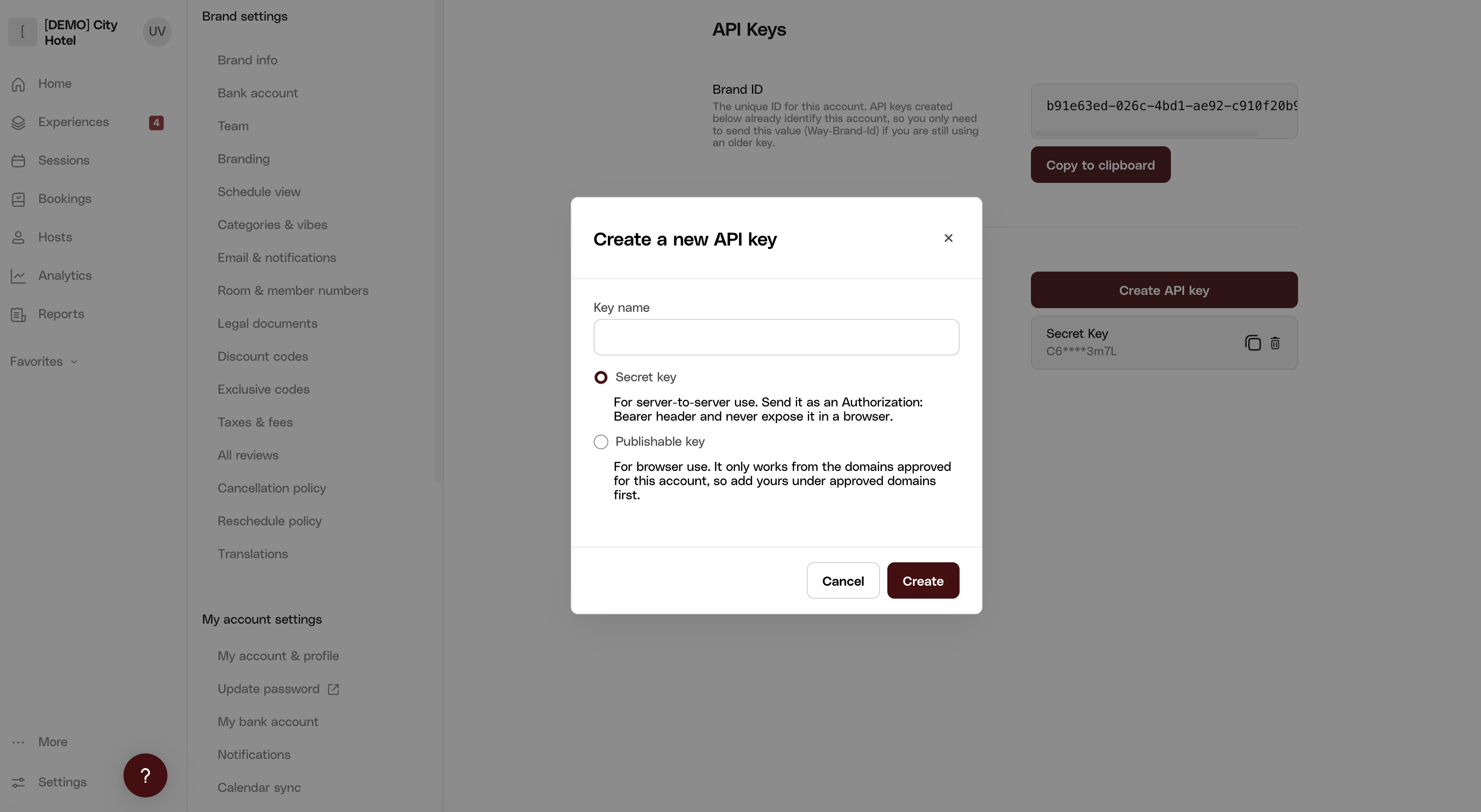 Also note the **Brand ID** shown on the same page - the key already identifies your brand, but some endpoint URLs include it as a path segment.
A secret key must only be used from your server. Never embed it in client-side code or expose it to end users - for browser use, create a [publishable key](/authentication#create-an-api-key) instead.
If you manage multiple brands, one organization key (**Organizations → API Keys** in the dashboard) covers all of them: send it on its own for organization-scoped endpoints and for brand-scoped endpoints whose resource is in the URL path, or add a `Way-Brand-Id` header to scope a request to one brand. See [Authentication](/authentication#brand-keys-and-organization-keys) for the details.
Keys issued before the `way_` format are sent as `Way-Brand-Id` + `Way-Secret-Key` headers and keep working. See [Legacy authentication](/legacy-authentication).
Every request is authenticated with a single header: `Authorization: Bearer `.
Open this endpoint in the interactive playground - paste your API key into the authorization field, pick the server, and hit Send. No code needed.
A successful response contains your brand's published listings:
```json theme={null}
{
"items": [
{
"id": "1f4877f4-a082-4a05-9cbf-fa129b28f01c",
"title": "Sunset Sailing Tour",
"kind": "EXPERIENCE",
"startingPrice": 8900,
"brandCurrency": "USD"
}
],
"meta": { "itemCount": 1, "totalItems": 12, "currentPage": 1 }
}
```
These are the listings your integration can display and take bookings for.
**"Listings" are your experiences, packaged for display.** A *listing* is how an experience appears on the storefront - title, photos, price - while the *experience* behind it (sessions, capacity, pricing) is the item actually being booked, referenced by `experienceId`. This endpoint returns the display catalog; [Get experiences](/api-reference/experiences/get-experiences) returns the underlying records. See [Introduction](/introduction#listings-experiences-and-resource-groups).
```javascript theme={null}
const response = await fetch("https://api.letsway.com/v3/listings", {
headers: {
Authorization: `Bearer ${process.env.WAY_API_KEY}`,
},
});
const { items } = await response.json();
```
## Troubleshooting
The key is wrong, or it belongs to the other environment - `way_sk_live_` keys only work against production and `way_sk_test_` keys against staging. Check you're calling the base URL that matches your key. See [Environments](/environments).
API access isn't enabled for your brand or organization (contact your Way representative) - or the key doesn't cover what you addressed: a brand key used against another brand's URL, an organization key scoped to a brand outside that organization, or a publishable key used from a domain that isn't approved.
Your brand has no published listings. Publish at least one listing in the dashboard, or query staging where your test data lives.
## Next steps
Key types, brand-level vs organization-level access.
From listing to paid booking, step by step.
Also note the **Brand ID** shown on the same page - the key already identifies your brand, but some endpoint URLs include it as a path segment.
A secret key must only be used from your server. Never embed it in client-side code or expose it to end users - for browser use, create a [publishable key](/authentication#create-an-api-key) instead.
If you manage multiple brands, one organization key (**Organizations → API Keys** in the dashboard) covers all of them: send it on its own for organization-scoped endpoints and for brand-scoped endpoints whose resource is in the URL path, or add a `Way-Brand-Id` header to scope a request to one brand. See [Authentication](/authentication#brand-keys-and-organization-keys) for the details.
Keys issued before the `way_` format are sent as `Way-Brand-Id` + `Way-Secret-Key` headers and keep working. See [Legacy authentication](/legacy-authentication).
Every request is authenticated with a single header: `Authorization: Bearer `.
Open this endpoint in the interactive playground - paste your API key into the authorization field, pick the server, and hit Send. No code needed.
A successful response contains your brand's published listings:
```json theme={null}
{
"items": [
{
"id": "1f4877f4-a082-4a05-9cbf-fa129b28f01c",
"title": "Sunset Sailing Tour",
"kind": "EXPERIENCE",
"startingPrice": 8900,
"brandCurrency": "USD"
}
],
"meta": { "itemCount": 1, "totalItems": 12, "currentPage": 1 }
}
```
These are the listings your integration can display and take bookings for.
**"Listings" are your experiences, packaged for display.** A *listing* is how an experience appears on the storefront - title, photos, price - while the *experience* behind it (sessions, capacity, pricing) is the item actually being booked, referenced by `experienceId`. This endpoint returns the display catalog; [Get experiences](/api-reference/experiences/get-experiences) returns the underlying records. See [Introduction](/introduction#listings-experiences-and-resource-groups).
```javascript theme={null}
const response = await fetch("https://api.letsway.com/v3/listings", {
headers: {
Authorization: `Bearer ${process.env.WAY_API_KEY}`,
},
});
const { items } = await response.json();
```
## Troubleshooting
The key is wrong, or it belongs to the other environment - `way_sk_live_` keys only work against production and `way_sk_test_` keys against staging. Check you're calling the base URL that matches your key. See [Environments](/environments).
API access isn't enabled for your brand or organization (contact your Way representative) - or the key doesn't cover what you addressed: a brand key used against another brand's URL, an organization key scoped to a brand outside that organization, or a publishable key used from a domain that isn't approved.
Your brand has no published listings. Publish at least one listing in the dashboard, or query staging where your test data lives.
## Next steps
Key types, brand-level vs organization-level access.
From listing to paid booking, step by step.